
Empower review: a clear view from the highest hill
A free dashboard that connects daily spending to long-range wealth—with a few boundaries worth understanding.
Empower is our best budgeting and money app for 2026, scoring 4.8 out of 5. Its free Personal Dashboard turns bank, card, loan, and investment accounts into a coherent picture of cash flow and net worth. Choose something else only if detailed category limits matter more than breadth.
After 35 days, 416 imported transactions, and six connected institutions, Empower did the rarest thing a finance app can do: it made the present month feel related to the next twenty years. A supermarket charge sits in cash flow; the remaining cash changes net worth; net worth feeds a retirement projection. That continuity, offered at no cost, is why it leads our ranking.
We tested the official Empower Personal Dashboard on iOS and the web from June 18 through July 22, 2026. Sync involved two checking accounts, a savings account, two credit cards, and one brokerage. We corrected deliberately ambiguous purchases, created savings goals, exported transactions, ran the retirement planner, and recorded delayed refreshes. Prices and features were rechecked August 5, 2026.
What works
- Excellent free account and net-worth overview
- Strong investment fee and allocation analysis
- Useful cash-flow trends with fast transaction search
- Retirement scenarios connect today’s choices to later outcomes
What does not
- No true category-by-category budget
- Occasional prompts for advisory services
- Some investment connections refresh slowly
- Dense interface for someone tracking only spending
The score, with the arithmetic exposed
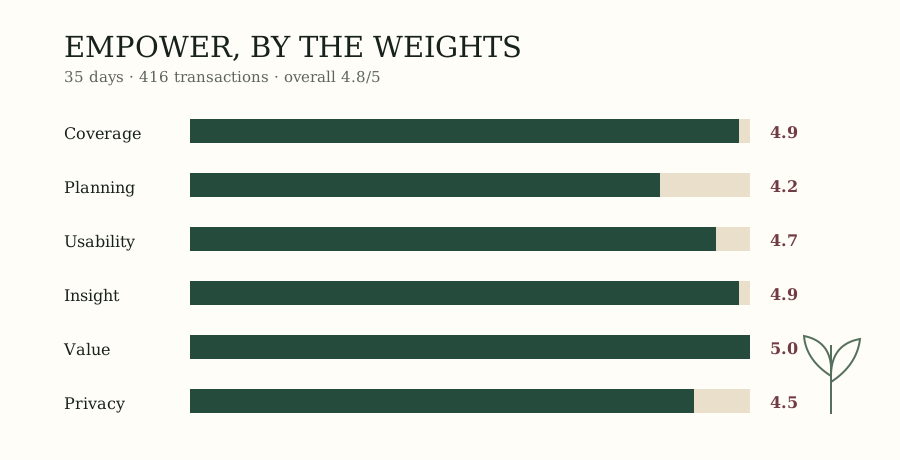
| Category | Weight | Score | Weighted points |
|---|---|---|---|
| Account coverage & reliability | 25% | 4.8 | 1.20 |
| Planning & cash flow | 25% | 4.6 | 1.15 |
| Daily usability | 20% | 4.8 | 0.96 |
| Insight & reporting | 15% | 5.0 | 0.75 |
| Value | 10% | 5.0 | 0.50 |
| Privacy & support | 5% | 5.0 | 0.25 |
| Total | 100% | 4.81/5 |
Cash flow is the center, not the ceiling
Empower’s budgeting layer is deliberately broad. The dashboard classifies spending, compares the current month with prior periods, and supports a total monthly spending target. In our sample, 91% of transactions landed in a sensible top-level category before correction. Recurring merchants such as utilities and insurance were generally stable; mixed retailers and payment services needed attention.
The weakness is precision. You cannot assign $480 to groceries, roll $36 into next month, and give every dollar a job. PocketGuard makes discretionary limits more immediate, and YNAB makes allocations far more deliberate. Our Empower versus PocketGuard comparison shows the tradeoff category by category.
The broadest free financial map
The reason to tolerate that modest budget is everything around it. Net worth updates as accounts refresh. Investment holdings are examined for allocation and fund expenses. The retirement planner lets you change income, savings, retirement age, Social Security, and large future expenses, then runs probability-based projections. No forecast deserves blind faith, but this one makes assumptions visible enough to challenge.
During the test, four of six institutions refreshed without intervention. One credit-card connection required a fresh sign-in after its bank changed authentication; one brokerage lagged by roughly a day twice. No transactions were duplicated. Those results are strong, though every aggregator’s reliability depends partly on the institutions a particular household uses.
For a slower look at what that joined view does to attention, read our 30-day diary, Empower’s dashboards, considered.
Free, with a commercial edge
The Personal Dashboard costs nothing. Empower’s business also includes paid wealth management: the advisory service generally requires $100,000 in investable assets and begins at 0.89% of assets per year below $1 million, with lower tiers at larger balances. Dashboard users may see invitations to speak with an adviser. We saw two prominent prompts during onboarding and quieter invitations later.
That arrangement is not hidden, but it matters. A free dashboard can be excellent while also serving as an introduction to a paid service. Decline if it is irrelevant. Anyone considering advisory management should evaluate the fee and service independently; a good free app is not, by itself, a reason to transfer investments.
Our verdict
Empower earns 4.8/5 and our editor’s choice because no other free tool in this test connected spending, investments, debt, and retirement as effectively. It is perspective rather than discipline: pair it with simple bank alerts if you need firmer daily limits, or choose PocketGuard if one safe-to-spend figure would change your behavior.
Frequently asked questions
Is the Empower Personal Dashboard really free?
Yes. Empower’s Personal Dashboard, including account aggregation, cash-flow views, net-worth tracking, and the retirement planner, costs $0. Empower also offers an optional wealth-management service. That advisory relationship is separate, generally requires at least $100,000 in investable assets, and begins at a 0.89% annual management fee for accounts under $1 million.
Is Empower good for making a strict monthly budget?
Not especially. Empower automatically groups income and spending and lets you set a single monthly spending target, but it does not provide category-by-category envelope assignments or rollover rules. People who want firm limits should consider PocketGuard or YNAB. Empower is better for observing cash flow, investments, and net worth together than policing each category.
Can Empower move money from my linked accounts?
Linking an outside bank or card to the dashboard is designed for viewing, analysis, and planning; it does not give the dashboard permission to move money from that institution. Empower uses encryption and multi-factor authentication. As with any aggregator, review the current security disclosures and disconnect any institution you no longer want included.
Who should not use Empower?
Skip Empower if your main need is hands-on zero-based budgeting, shared envelope management, or a distraction-free tool with no advisory prompts. Its breadth can feel excessive when all you need is a weekly spending number. Our PocketGuard review covers the simpler alternative, while our app ranking includes stronger manual-planning systems.
Continue with our complete 2026 app ranking or read how to choose a budgeting app before connecting an account.